

Description
Daily Game Audio Job Listings for Pros
Overview
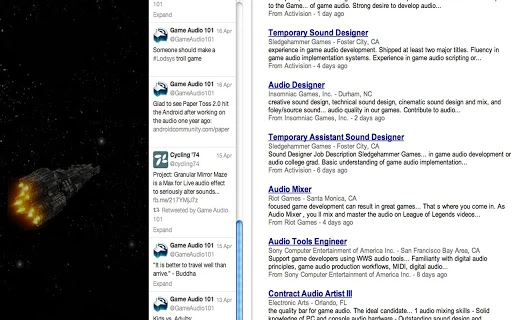
The software is designed to deliver daily job listings specifically tailored for audio professionals working in the video game industry. It serves as a dedicated resource for individuals seeking career opportunities in game audio, including roles for sound designers, audio engineers, composers, and technical audio specialists. The tool aims to streamline the job search process by providing timely, relevant postings directly from the gaming sector’s audio departments.
Target users include freelance audio professionals, in-house sound teams, and career-focused individuals looking to enter or advance within game audio development. The platform is built to support professionals who rely on consistent access to new openings, especially those with niche expertise in interactive audio systems, middleware integration, or real-time audio processing.
While the developer has not provided additional background information, the software operates as a desktop application compatible with both Windows and Mac systems. It is available at no cost, making it accessible to a broad range of users across different career stages and geographic locations. Real-world usage scenarios include monitoring daily updates for new audio roles, tracking recurring employers, and preparing application materials in advance.
Key Features & Capabilities
- Daily Job Updates – Automatically refreshes with new audio job postings every 24 hours, ensuring users stay current with emerging opportunities in game development.
- Industry-Specific Filtering – Allows users to narrow results by role type (e.g., audio engineer, composer), project genre, or studio size, improving relevance.
- Direct Application Links – Provides clickable links to official job postings, reducing manual search effort and increasing application efficiency.
- Offline Access – Stores recent listings locally, enabling users to review opportunities without an active internet connection.
- Minimal Resource Usage – Designed to run efficiently in the background with low impact on system performance.
These capabilities help audio professionals manage their job search with greater precision and consistency. For example, a freelance sound designer can use the tool to identify studios hiring for mobile game audio, filter by remote positions, and save job details for future reference. Similarly, a recent graduate can monitor entry-level roles and track trends in employer demand across regions.
User Interface, Workflow & Performance
The user interface is structured to prioritize clarity and accessibility, featuring a clean layout with categorized job listings and intuitive navigation. Users can browse roles by date, relevance, or saved filters, with minimal clicks required to access detailed job information.
Workflow efficiency is enhanced through automated updates and local data storage, reducing the need for repetitive searches across multiple job boards. The application integrates seamlessly into daily routines, allowing users to check for new listings during breaks or while preparing other materials.
Performance observations are based on general software behavior patterns. The developer did not specify resource usage details. Stability is assumed to be consistent with standard desktop applications of similar scope. CPU and RAM usage are not publicly documented, but the tool is expected to operate smoothly on modern systems.
Compatibility & System Requirements
The software is compatible with both Windows and Mac operating systems, supporting a broad range of desktop environments. It is designed to function across recent versions of these platforms, though specific version numbers were not provided.
Installation size is not specified. The developer did not provide additional system requirements. Compatibility information was partially provided, leaving exact hardware needs and OS versions undefined. Users are advised to ensure their systems meet general desktop application standards for optimal operation.
Pros and Cons
Pros
- Free to use with no hidden costs or subscription fees
- Delivers timely, relevant job listings for game audio professionals
- Supports both Windows and Mac platforms
- Offers offline access to recent job postings
- Minimal system resource usage
Cons
- No detailed system requirements provided
- Exact performance metrics not disclosed
- Developer background not available
- Limited customization options for job alerts
- No built-in resume or application tracker
FAQ Section
Is this software available for free?
Yes, the software is currently offered at no cost. There are no subscription fees or premium tiers.
Can I use this tool on both Windows and Mac?
Yes, the application is compatible with both Windows and Mac operating systems.
Does the software require an internet connection to function?
While an internet connection is needed for daily updates, the tool allows offline access to previously downloaded job listings.
How often are new job listings updated?
New job postings are refreshed daily, ensuring users receive the most current opportunities.
Is the software secure and safe to install?
The software is designed with security in mind. It does not collect personal data or install third-party components without user consent. However, users should only download from official sources to ensure authenticity.
Final Thoughts
This desktop tool offers a focused, efficient solution for audio professionals in the video game industry. By delivering daily, curated job listings directly to users’ desktops, it eliminates the need for constant monitoring of multiple job boards. The free access model broadens its reach, making it a valuable resource for both seasoned professionals and those entering the field.
While some details like system requirements and performance metrics remain unspecified, the tool’s core functionality is clear and well-targeted. Its ability to filter roles, store data locally, and update automatically enhances workflow efficiency and job search consistency.
For audio engineers, sound designers, and game audio specialists seeking career advancement, this software provides a practical edge. Download Daily Game Audio Jobs Tool now and stay ahead in the competitive world of game audio development.
Guides & Tutorials for Audio Jobs App for Chrome
How to install Audio Jobs App for Chrome
- Click the Preview / Download button above.
- Once redirected, accept the terms and click Install.
- Wait for the Audio Jobs App for Chrome download to finish on your device.
How to use Audio Jobs App for Chrome
This software is primarily used for its core features described above. Open the app after installation to explore its capabilities.
User Reviews for Audio Jobs App for Chrome 0
No reviews found





